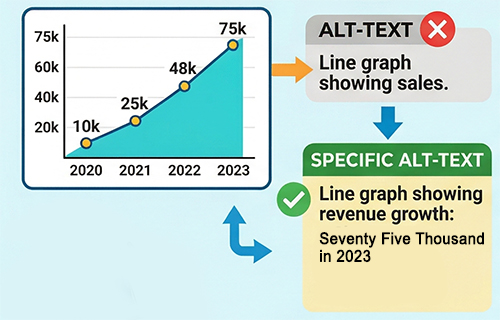
For most users, a financial table or a data-heavy PDF is a quick scan. But for the millions of people globally who use screen readers (like JAWS, NVDA, or VoiceOver), numerical data can be a major “bottleneck.”
As we move toward stricter Web Content Accessibility Guidelines (WCAG), converting complex digits into written words—specifically within Alt-Text and Aria-Labels—is becoming a best practice for inclusive design.
1. The Screen Reader Struggle: Digits vs. Words
While modern screen readers are intelligent, they often struggle with the “context” of numbers.
- Large Figures: A screen reader might encounter $1,500,000 and read it as “One comma five zero zero comma zero zero zero dollars,” rather than “One million, five hundred thousand dollars.”
- Ambiguous Symbols: Symbols like #, –, or / can be ignored or misread depending on the user’s settings.
- Scientific Notation: Complex data like $1.2 \times 10^{-5}$ is almost impossible for a standard screen reader to convey clearly without manual text intervention.
2. The Power of “Hidden” Number Words
You don’t have to clutter your visual design with long strings of text. Instead, accessibility experts use “hidden” text or Alt-Text to provide the verbal equivalent of a figure.
Example: Financial Charts
If you have a bar chart showing a profit of $25,400,000, the Alt-Text should not just say “Profit Chart.” It should say:
“Bar chart showing a total profit of twenty-five million, four hundred thousand dollars.”
By using a Number-to-Words converter, you ensure that the text you paste into your Alt-Text is spelled correctly and formatted perfectly for a natural-sounding voice synthesis.
3. Compliance and the Law (WCAG 2.1/2.2)
In 2026, organizations are increasingly audited for Perceivable and Understandable content—two core pillars of WCAG.
- Perceivable: Information must be presented in ways all users can perceive. If a user can’t hear the number correctly, it isn’t perceivable.
- Understandable: Using words like “Billion” instead of “1,000,000,000” reduces cognitive load for users with certain learning disabilities or those using assistive technology.
4. Professionalism in Financial Reporting
Governments and large NGOs now prioritize Accessible PDFs. When you export a financial report, using your tool to generate a “Word Version” of your totals in the document’s metadata (Alt-Text) ensures:
1. Legal Compliance: Meeting ADA (USA) or EAA (Europe) standards.
2. Inclusivity: Ensuring visually impaired investors or stakeholders have the same access to data as everyone else.
3. Accuracy: Avoiding the “robotic” mispronunciation of vital financial stats.
Summary Checklist for Accessible Numbers
| Number Type | The Visual | The Accessible Alt-Text |
|---|---|---|
| Large Currency | $4.2B | Four billion, two hundred million dollars |
| Dates | 05/06/26 | June fifth, twenty-twenty-six |
| Fractions | 3/4 | Three-quarters |
| Decimals | 0.75% | Zero point seven five percent |
How Our Tool Helps
Writing out “Forty-seven million, eight hundred ninety-two thousand” manually for every image description in a 50-page report is exhausting and prone to typos. Our NTOW Converter allows you to quickly generate these descriptions, ensuring your accessibility compliance is fast, accurate, and professional.